To transcribe Spanish audio on iPhone, set the transcript language to Spanish and record or import the audio in a transcription app such as Mangonote. It turns Spanish speech into Spanish text on the iPhone itself, offline, with a model that’s strong for Spanish. If you need English, set the summary language to English or ask Ask AI to translate a passage; the transcript itself stays in Spanish.
The same steps work for other languages; there’s a table for those below.
Step 1: Set the language to Spanish
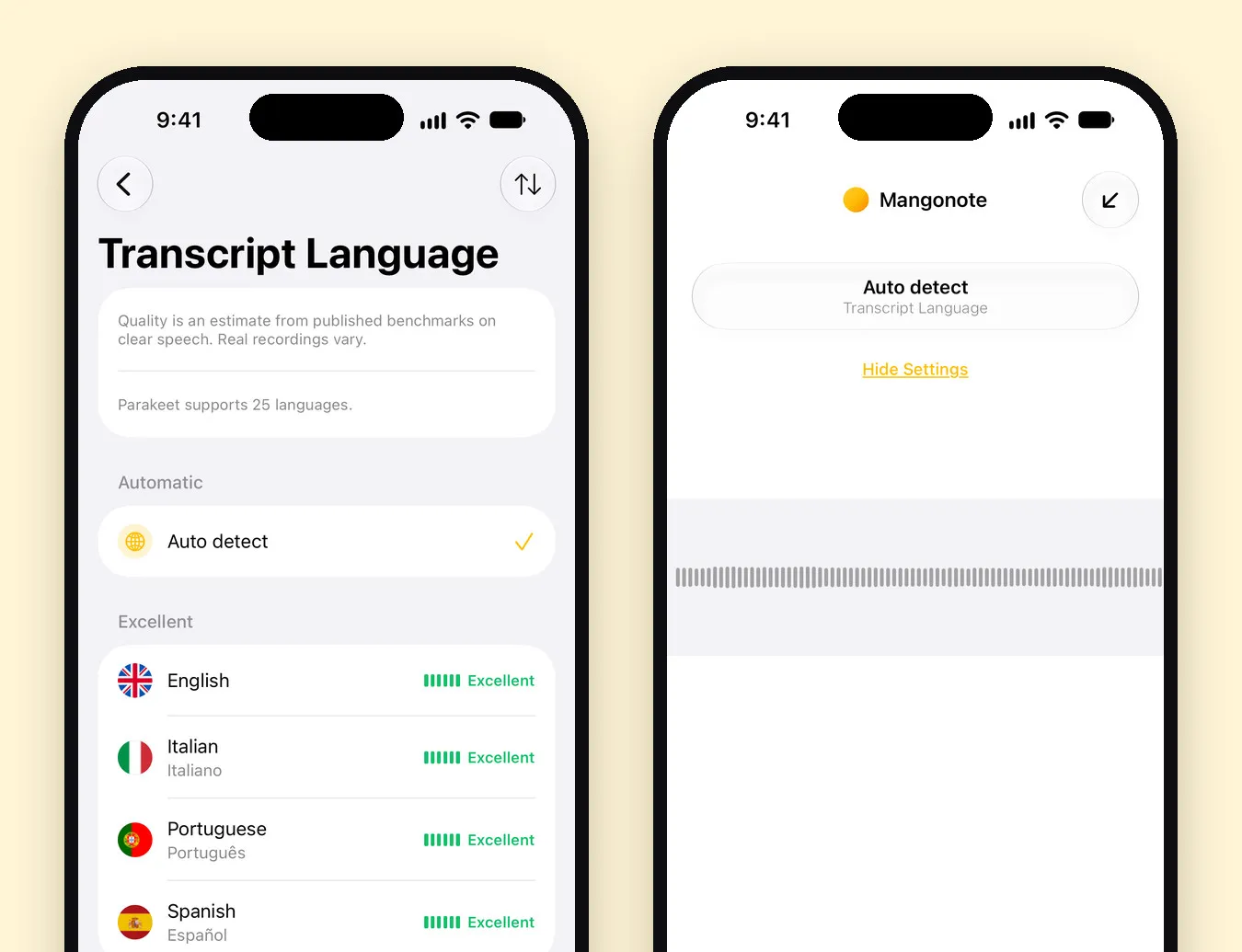
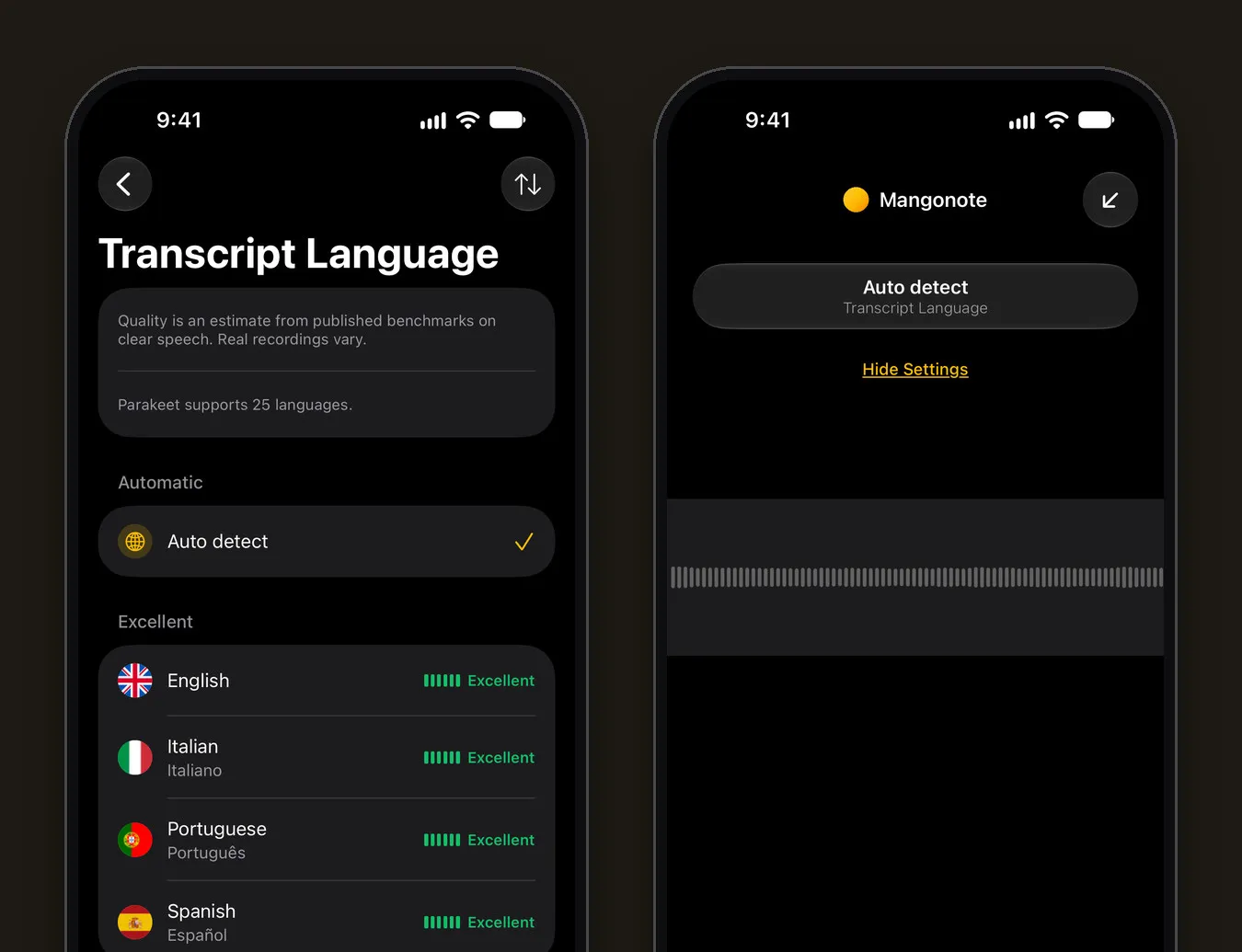
In Mangonote, open Settings › Transcription & AI › Language and pick Spanish. You can also set it for a single recording: on the recording screen, tap the settings button and choose Transcript Language.
Auto detect works too, but naming the language helps with short clips, accents and recordings that start with music or silence.
Step 2: Check the model’s quality mark
Mangonote has several on-device speech models. The Language list shows how well the selected model handles each language, from Excellent to Weak, based on published benchmarks on clear speech. With Parakeet, the default on iPhone 12 and newer, Spanish is rated Excellent. Whisper Multilingual, built into the app, covers Spanish too.
Step 3: Record or import the Spanish audio
- Record: tap Start Recording, then the checkmark when you’re done.
- Import a file: + › Audio for MP3, M4A or WAV from the Files app.
- Import a video: + › Video from Photos.
The transcript is made on your iPhone; the audio isn’t uploaded.
Step 4: Get it in English, if you need to
- English summary: set Summary Language to English in Settings › Transcription & AI. A Spanish meeting gets English notes, decisions and action items.
- Translation on demand: on the Ask AI tab, ask “Translate the first two minutes into English” or “What did Carlos say about the budget? Answer in English.”
Mangonote doesn’t produce a separate translated transcript. For legal or official translations, use a qualified translator.
Other languages
The steps are the same; the best model depends on the language. These are the models’ own descriptions in the app:
| Language group | Models to try |
|---|---|
| Spanish, Portuguese, French, German, Italian and other European languages | Parakeet (25 European languages), Whisper Multilingual |
| Chinese, Japanese, Korean | SenseVoice, Whisper Multilingual |
| Many other widely spoken languages | Whisper Multilingual (99 languages), Nemotron (35) |
| Rare and regional languages | Omnilingual (up to 1,600) |
Check the Language list for your language’s quality mark before you download a model. More on each model in Whisper transcription on iPhone.
Built-in option: Voice Memos
Apple’s Voice Memos and Notes transcribe Spanish too, on iPhone 12 and later, alongside nine other languages (Apple’s guide). They’re a good free option for reading back a memo; Mangonote adds editing, summaries in another language, Ask AI and export. See Voice Memos vs. Mangonote.
Tips for accurate Spanish transcripts
- Name the language instead of Auto detect for short recordings.
- Record close to the speaker; distance hurts accuracy more than accent does.
- Check names, numbers and dates against the audio before you quote them.
Related guides
- Whisper transcription on iPhone, offline
- How to transcribe an interview
- How to summarize a recording with AI
Frequently asked questions
Can I transcribe Spanish audio on iPhone for free?
Yes. Apple's Voice Memos and Notes transcribe Spanish on iPhone 12 and later, and Mangonote is free to start and transcribes Spanish on the device, offline.
Does Mangonote translate the transcript into English?
The transcript stays in the language spoken. You can get an English summary by setting Summary Language to English, and ask Ask AI to translate any part of the note.
Which model is best for Spanish in Mangonote?
Open Settings › Transcription & AI › Language to see the quality mark for Spanish with the selected model. Parakeet, the default on iPhone 12 and newer, rates Spanish as Excellent; Whisper Multilingual also covers it.
What about audio that mixes Spanish and English?
Leave the language on Auto detect, or pick the main language. Mixed speech is harder for any model, so check the transcript where people switch languages.
Does it work offline?
Transcription does. Summaries, translation with Ask AI and iCloud sync need a connection.
Start capturing the thoughts you keep losing
Download Mangonote, record your first note, and watch it become searchable text in seconds, right on your iPhone.