The best AI note taker for iPhone depends on where your notes come from. Otter and Fireflies suit online meetings, with a bot that joins the call. Granola suits desktop meetings without a bot. Plaud is built around a dedicated recorder. Apple’s Voice Memos and Notes are free and built in. Mangonote suits in-person recordings and files on the iPhone itself, with transcription on the device, offline, and no account.
We make Mangonote, so here’s how we kept this fair: every fact about another app comes from that app’s own website, pricing page or App Store listing, linked below and checked on 13 November 2026. Where we couldn’t confirm something, we say so.
Quick picks
- Online meetings, joined automatically: Otter or Fireflies
- Desktop meetings without a bot: Granola
- A dedicated pocket recorder: Plaud
- Many export formats and translation: Notta
- Turning a ramble into polished writing: AudioPen
- Free and built in: Apple Voice Memos and Notes
- Private, offline, on-device transcription on iPhone, with AI summaries when you want them: Mangonote
Comparison table
| App | Best for | Where speech becomes text | Joins video calls | Free plan | Paid from |
|---|---|---|---|---|---|
| Mangonote | In-person recordings and files, private notes | On the iPhone, offline | No | Free to start, daily limits, Ask AI 5 messages a day | Mangonote Plus subscription |
| Otter | Online meetings, live transcript, teams | Not stated | Yes (Zoom, Teams, Meet) | 300 min/month, 30 min per conversation, 3 lifetime imports | $16.99/month or $99.99/year (App Store) |
| Fireflies | Teams that want a meeting bot plus mobile recording | Not stated | Yes | Includes storage and AI credits | $10/seat/month billed annually, $18 monthly |
| Granola | Desktop meeting notes without a bot | Cloud | No | Basic, with limited meeting history | $14/user/month (Business) |
| Notta | Multilingual transcription, translation, exports | Not stated for iPhone | Yes, plus a bot-free recorder | 120 min/month, 3 min per conversation | $97.99/year (notta.ai) or $14.99/month (App Store) |
| Plaud | A dedicated hardware recorder | Cloud | No (bot-free desktop app) | 300 min/month, included with each Plaud device | $17.99/month or $99.99/year, plus the device |
| Voicenotes | Capturing ideas and asking questions across notes | Not stated | Business plan only | 30 min per meeting, 14-day history | $9/user/month (voicenotes.com) |
| AudioPen | Turning spoken rambles into clean text | On-device or cloud, your choice | No | Recordings up to 3 minutes | $99/year or $11/month |
| Apple Voice Memos + Notes | Free transcripts of your own recordings | Not stated | No | Built into iOS (iPhone 12 or later) | Free |
Prices in USD as shown on each vendor’s site or the US App Store on 13 November 2026; they change, and App Store prices can differ from web prices. “Not stated” means the vendor’s own pages don’t say.
Mangonote
What it is: an AI note taker for iPhone. You record or import audio and video; speech is turned into text on the iPhone with on-device models (Whisper covers about 100 languages, Omnilingual up to 1,600). AI then writes a title, summary, key decisions and action items in a style you pick, and Ask AI answers questions about any note, with a choice of models from OpenAI, Anthropic, Google or DeepSeek.
Strengths: transcription on the device, so it works offline and the audio isn’t uploaded; AI is optional and can be turned off; no account; folders, search and Markdown export.
Limits: it doesn’t join video calls (import the recording instead), there’s no live transcript while recording, and transcripts don’t label speakers. The free plan has daily limits.
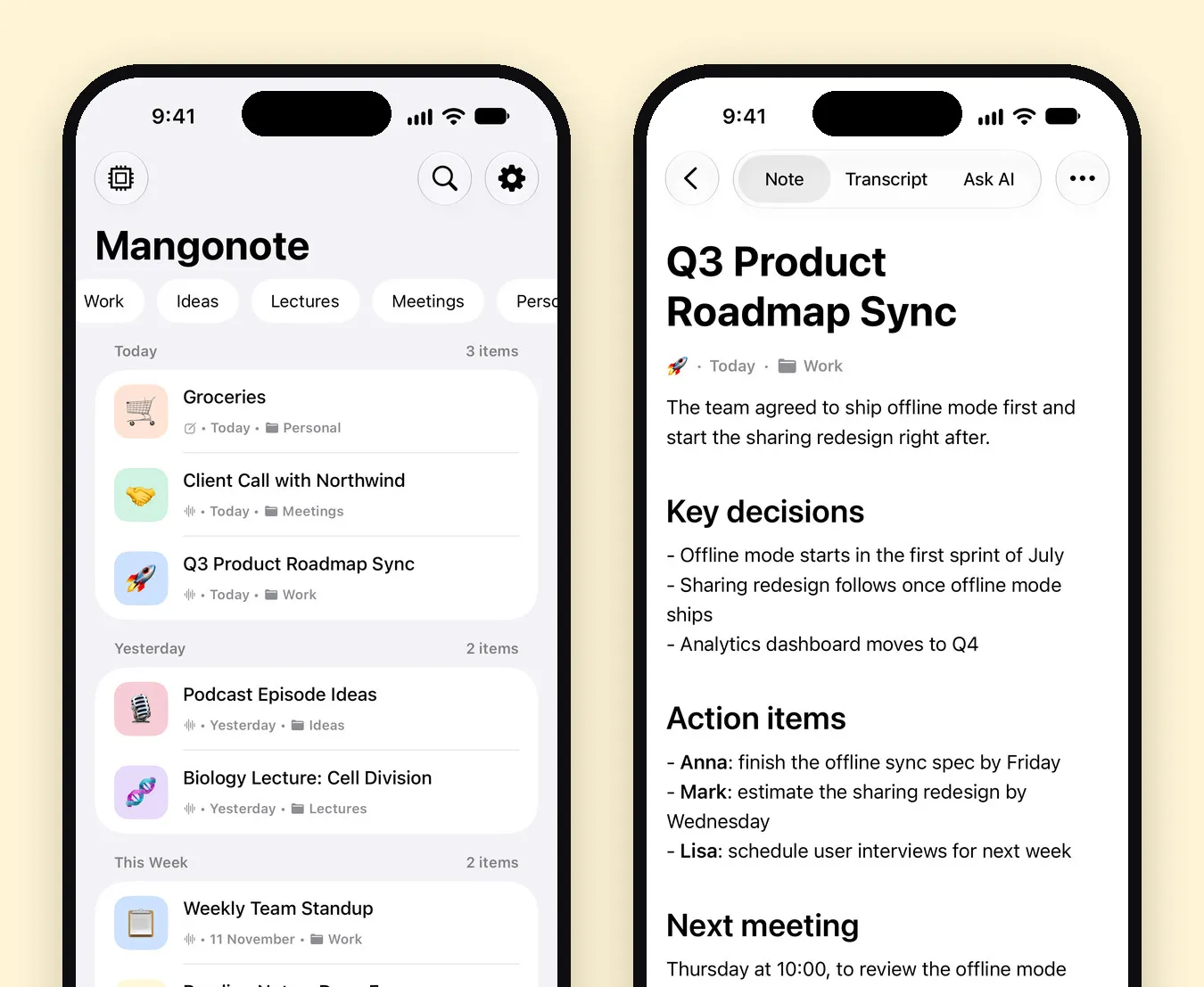
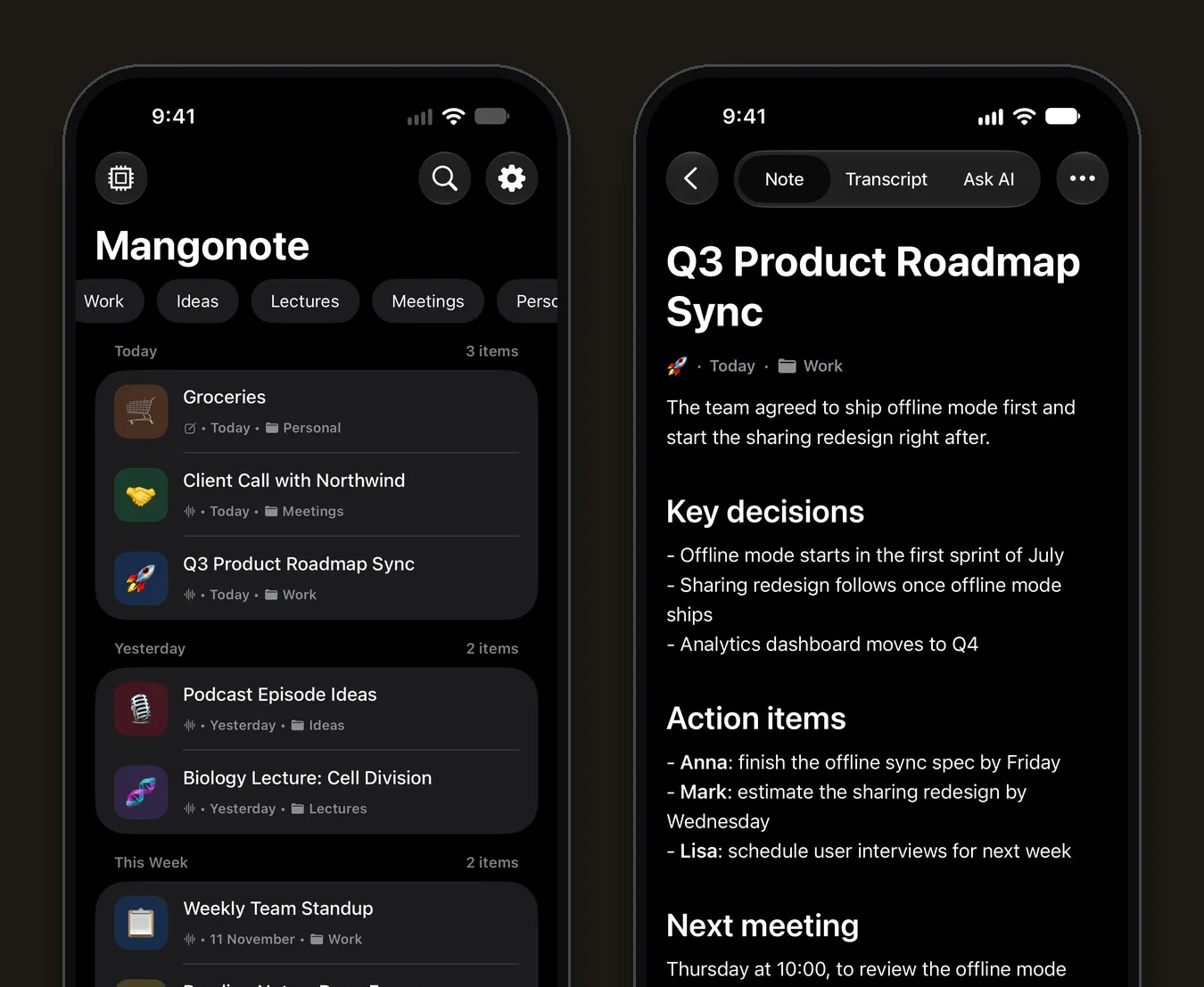
Pick it if: you record in person (lectures, interviews, meetings in a room, voice memos) or import files, and you care where your audio goes. Guides: meetings, lectures, interviews.
Otter
What it is: a meeting assistant with an iPhone app. Its pricing page lists Zoom, Microsoft Teams and Google Meet support, live transcription and speaker identification on the free Basic plan. Basic includes 300 minutes a month, up to 30 minutes per conversation and 3 file imports in total.
Price: the US App Store lists Pro at $16.99 a month or $99.99 a year (App Store).
Good to know: Otter’s pricing page lists six transcription languages (English, Spanish, French, German, Japanese and Chinese); its App Store page lists four. Its privacy page describes how it de-identifies data used to train its models.
Pick it if: most of your meetings are online and you want a live transcript and a bot that joins for you. If you’re weighing a switch, see Otter.ai alternatives on iPhone.
Fireflies
What it is: a notetaker that joins Zoom, Google Meet and Microsoft Teams, with an iPhone app that also records in-person meetings, interviews and lectures, with speaker labels, in 100+ languages (App Store). Its pricing page says it does not use meeting data to train AI models.
Price: Fireflies’ own pricing guide (July 2026) lists Pro at $10 per seat a month billed annually, or $18 monthly. The free plan includes limited storage and AI credits; downloading transcripts needs a paid plan, per its help center.
Pick it if: your team lives in video calls and wants every meeting captured and searchable in one workspace.
Granola
What it is: a meeting notes app that records without a bot on the desktop. Its iPhone app takes notes during in-person meetings and outbound phone calls, and can’t transcribe virtual calls on mobile (Granola help). Audio is processed in the cloud and not retained, per its privacy post.
Price: Business is $14 per user a month; the free Basic plan has limited meeting history (pricing).
Pick it if: you take most meeting notes on a Mac or PC and want a bot-free experience, with the phone for in-person meetings.
Notta
What it is: a transcription app with an iPhone app, real-time transcription in 58 languages, translation into 42, AI summaries, and exports to TXT, DOCX, Excel, PDF and SRT (App Store). It offers both a meeting bot and a bot-free recorder.
Price: the free plan has 120 minutes a month with up to 3 minutes per conversation. Pro is $97.99 a year on notta.ai; the App Store lists Pro at $14.99 a month.
Good to know: Notta’s home page mentions on-device transcription, but doesn’t say whether that applies to the iPhone app, so we couldn’t confirm it.
Pick it if: you need subtitle files, office formats or translation.
Plaud
What it is: AI voice recorders (Plaud Note and NotePin) with a companion iPhone app. The app recommends a Plaud device for in-person meetings and calls, and Plaud Desktop for online meetings without a bot (App Store). Plaud’s Trust Center says data is processed in the cloud, and that training on your data needs your opt-in.
Price: every device includes the Starter plan with 300 minutes a month; Pro is $17.99 a month or $8.33 a month billed annually (pricing).
Pick it if: you want a separate recording device rather than your phone, and you’re happy with cloud processing.
Voicenotes
What it is: an AI notes app on iPhone, Android, Mac, Windows, web and Apple Watch that records online and in-person meetings without a bot, plus a meeting bot on the Business plan (pricing). Its pricing page says Voicenotes does not train on your data.
Price: free plan with up to 30 minutes per meeting and 14-day meeting history; Pro is $9 per user a month on the web. The App Store lists different in-app prices, so check before you buy.
Pick it if: you capture lots of short thoughts across devices and want to ask questions across all of them.
AudioPen
What it is: voice-to-text that rewrites what you say into clean, formatted text in a tone you choose. On iPhone you can choose cloud or on-device transcription; the AI rewrite always needs a connection (audiopen.ai).
Price: free recordings up to 3 minutes; Prime is $99 a year, or $11 a month in the App Store.
Pick it if: you mostly dictate drafts, posts and emails rather than record meetings. For long-form dictation, see our dictation guide.
Apple Voice Memos and Notes
What it is: built into iOS. On iPhone 12 and later, Voice Memos and Notes transcribe recordings in 10 languages, show a live transcript, and let you search and copy it. On iPhones with Apple Intelligence (iPhone 15 Pro and later), you can summarize transcripts (Voice Memos, Notes).
Pick it if: you want something free and simple for your own recordings in a supported language. Our voice memos guide shows how to go further.
How to choose
- Where do your recordings happen? Online calls → a meeting bot (Otter, Fireflies, Notta). In the room or on the go → a recorder app (Mangonote, Voicenotes, Granola’s iPhone app, Apple) or a device (Plaud).
- Does the audio have to stay on your phone? Then pick on-device transcription: Mangonote, AudioPen’s on-device option, or Aiko (transcription only). See 7 privacy questions to ask.
- Which language? Check the app’s list. Support ranges from a handful of languages to over a thousand.
- What do you need out? Summaries, a searchable library, subtitles, or a team workspace.
- Try the free plan with a real recording of yours before paying.
Related guides
- Otter.ai alternatives on iPhone
- Voice recorder apps with transcription for iPhone
- Is your AI note taker private? 7 questions to ask
- Plaud Note Alternative: Use the iPhone You Already Have
- Apple Voice Memos vs. Mangonote: Which Should You Use?
Frequently asked questions
What is the best AI note taker for iPhone?
It depends on where you take notes. For online meetings with a bot that joins the call, Otter or Fireflies. For desktop meetings without a bot, Granola. For a dedicated recorder, Plaud. For private, on-device transcription of in-person recordings and files on iPhone, Mangonote. For free and built in, Apple's Voice Memos and Notes.
Which AI note taker works offline on iPhone?
Apps that transcribe on the device can work offline. Mangonote transcribes on the iPhone with built-in models. AudioPen offers an on-device option for transcription (its AI rewrite needs a connection), and Aiko transcribes on the device but has no AI summaries.
Is there a free AI note taker for iPhone?
Most have a free plan with limits. Otter's includes 300 minutes a month, Notta's 120 minutes, and Mangonote's is free to start with daily limits and 5 Ask AI messages a day. Apple's Voice Memos and Notes transcription is built into iOS on iPhone 12 and later.
Which AI note takers join Zoom, Teams or Google Meet?
As of November 2026, Otter, Fireflies and Notta offer a bot that joins the call, and Voicenotes offers one on its Business plan. Granola and Plaud record without a bot. Mangonote doesn't join calls; it records in the room or imports the call recording.
How did you compare these apps?
We read each app's own website, pricing page and App Store listing on 13 November 2026, and only list what they state. We make Mangonote and tested it hands-on; we did not run the other apps through the same recordings.
Start capturing the thoughts you keep losing
Download Mangonote, record your first note, and watch it become searchable text in seconds, right on your iPhone.